Docker Services Automation
- About
- Development Setup
- QuickStart
- Components
- Config Persistence with ConfigObj
- Modularised App Framework
- Flask WebUI & Authentication
- Services WebUI Config Editor/Viewer
- Docker Object Functions
- External Log Parsing Functions
- Data Sources & Checks
- User Journey
About
This project is intended to auto-manage docker status start/stop based on usage
- periodically check configured services, pausing containers that have been unused or idle over a preset time
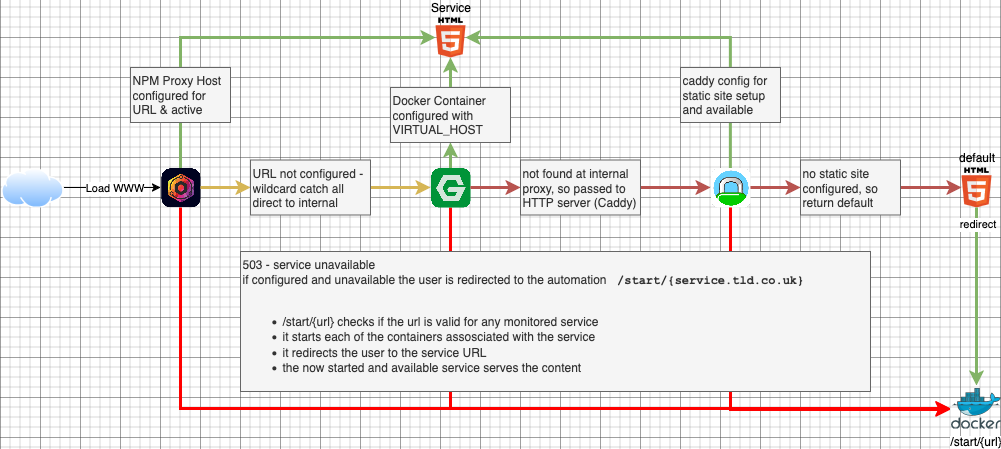
- on-demand restart by users navigating to, or redirecting to
/start/<url>which re-starts paused containers
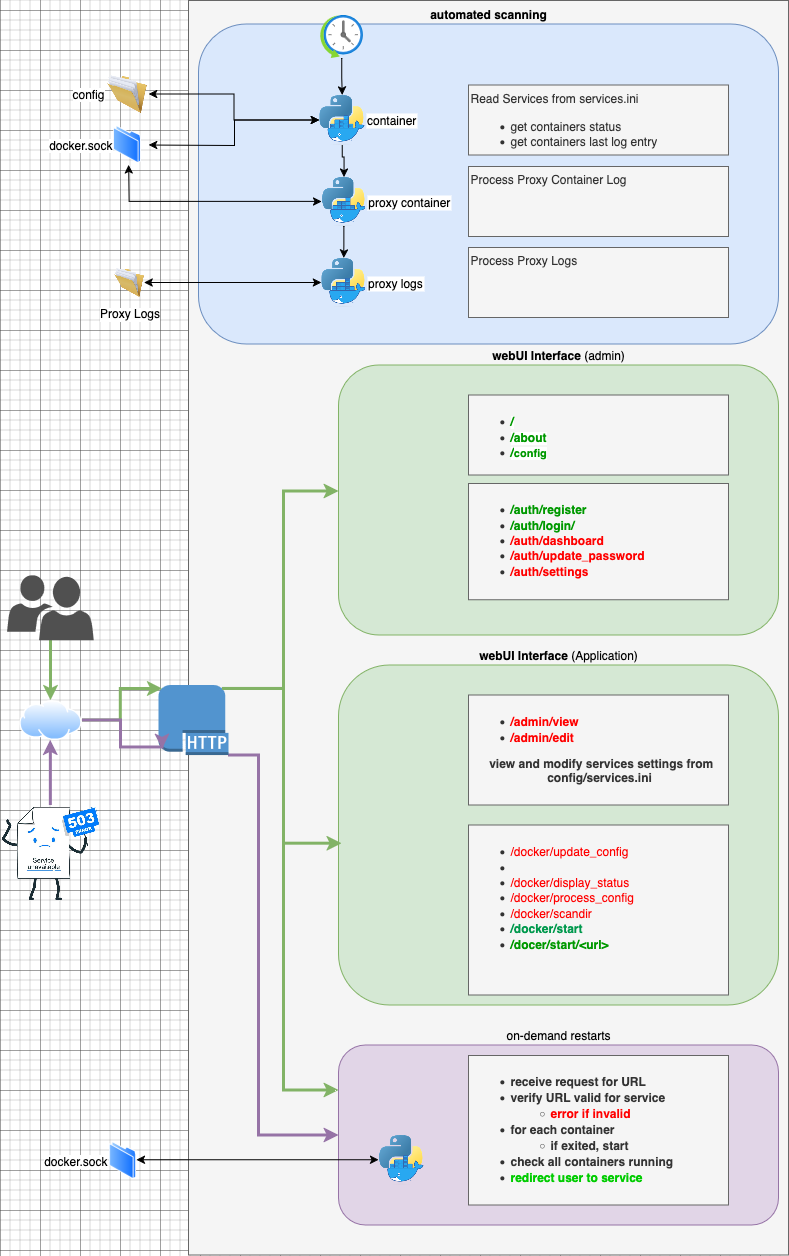
Monitoring and AutoShutdown
On-Demand Container Resume
Python Application to be containerised
Modular Python Framework with ConfigObj setings persistence
Periodicallly checking services with optional checks
Configurable Check : Containers
Configurable Check: Proxy Logs
Configurable Check: Proxy Container
Development Setup
QuickStart
- create the folder for your compose file
- create the compose file
- add in any log paths to map under /config/proxy_logs volume
- add a mount to the docker socke
docker-compose.yml
services:
  docker_automation:
    image: pknw1/docker_automation
    container_name: docker_automation
    environment:
      - VIRTUAL_HOST=docker_automation.tld.com
      - VIRTUAL_PORT=5000
      - TZ=Europe/Paris
    ports:
      - 0.0.0.0:5555:5000
    networks:
      - proxy
      - admin
    volumes:
      - ./config:/config
      - /var/log/npm:/config/proxy_logs/npm
      - /etc/localtime:/etc/localtime:ro
      - /var/run/docker.sock:/var/run/docker.sock
    restart: unless-stopped

networks:
  proxy:
    external: true
  admin:
    external: true
- create config/app.ini from example
config/app.ini
[config]
app_name=Docker Automation
logs_folder=config/proxy_logs/
logs_folder_postfix=access.log
log_file=config/app_logs/docker_automation.log
check_containers_interval=30
proxy_logs_timeformat=%d/%b/%Y:%H:%M:%S +0000
proxy_container_timeformat=%d/%b/%Y:%H:%M:%S +0000

[admin]
username=admin
admin_api_key=1234

[www]
home=enabled

[ntfy_notifications]
enabled=true
topic="channel"
- create config/services.ini basic from example
config/services.ini
[bookstack]
enabled = true
name = Bookstack
info = Info
max_idle = 60
checks = container, proxy_logs, proxy_container, all_logs
proxy_container = internal_proxy,
containers = bookstack, bookstack-mysql
urls = bookstack.notflix.pknw1.co.uk, bookstack.admin.pknw1.co.uk
proxy_logs = proxymanager/proxy-host-77_access.log,proxymanager-admin/proxy-host-3_access.log

[service-name]
enabled = <true|false>
name = service-name
info = info info info info info info info info info info info info info info info info
max_idle = 99
checks = <container|proxy_logs|proxy_container|all_logs>
proxy_container = <internal_proxy_container_to check STDOUT>,
containers = container_name, container_name2
urls = service.tld.com, service-admin.tld.com
proxy_logs = proxymanager/proxy-host-1_access.log,proxymanager-admin/proxy-host-1_access.log

[service-name]
enabled = [must be enabled or not - only enabled services will be checked]
name = [service-name]
info = [info displayed on user WebUI]
max_idle = [maximum time (in minutes) that we allow services to show no access/log activity before we stop containers]
checks = [ checks can be enabled or disabled here]
proxy_container = <internal_proxy_container_to check STDOUT>,
containers = [any containers either required for specific app operarion, or containers that comprise part of a larger ecosystem]
urls = [any URL that can access the apps]
proxy_logs = [the proxy manager logs to search for activity - the path should be how to locate the file from the docker /config/proxy_logs folder]
- start the container with docker compose up -d
 * Serving Flask app 'app'
 * Debug mode: on
WARNING: This is a development server. Do not use it in a production deployment. Use a production WSGI server instead.
 * Running on all addresses (0.0.0.0)
 * Running on http://127.0.0.1:5000
 * Running on http://149.202.72.112:5000
Press CTRL+C to quit
 * Restarting with stat
 * Debugger is active!
 * Debugger PIN: 100-852-284
- check app running via http://0.0.0.0:5555
Components
Components
Config Persistence with ConfigObj
Components
Modularised App Framework
Components
Flask WebUI & Authentication
Components
Services WebUI Config Editor/Viewer
Components
Docker Object Functions
Components
External Log Parsing Functions
Data Sources & Checks
- python docker container object
- container.status
- container.logs
- container.startedAt
- conainer.health.log
- container.network.settings
- Active Container Resources
- netstat check for active connections to container IP
- active process / lsof checks
- External log file entries
- Nginx Proxy Manager
- Proxy Host Acccess
- Redirection Access
- jwilder/nginx-proxy logs
- via container.logs()
- Caddy
- HA Proxy
- Nginx Proxy Manager