# Secure Web Proxy (ad-blocker)

<table border="1" id="bkmrk-" style="border-collapse: collapse; width: 100%;"><colgroup><col style="width: 33.3731%;"></col><col style="width: 23.9683%;"></col><col style="width: 42.7778%;"></col></colgroup><tbody><tr><td>[![squid-pihole.png](https://bookstack.notflix.pknw1.co.uk/uploads/images/gallery/2026-02/scaled-1680-/squid-pihole.png)](https://bookstack.notflix.pknw1.co.uk/uploads/images/gallery/2026-02/squid-pihole.png)</td><td>  
</td><td>#### Ad-Blocking Web Proxy

An On-Demand Proxy Connection providing Pi-Hole Ad-Blocker DNS

Windows | iOS | Android | Firefox | Chrome

</td></tr></tbody></table>

DNS ad blocking is a technique that prevents ads from loading by intercepting DNS queries and blocking requests to known ad-serving domains. Instead of reaching the intended ad server, these queries are redirected or dropped, effectively stopping ads at the DNS level. This approach can enhance browsing speed, improve privacy, and reduce data usage by filtering out unwanted content before it reaches your device. Unlike traditional ad blockers that run in browsers, DNS-based ad blocking works network-wide, offering a more comprehensive and efficient solution for ad prevention.

#### How DNS Ad Blocking Works?

At the core, DNS ad blocking is achieved by filtering **[DNS queries](https://wintelhive.com/dns-record-types/)**. When a user visits a website, their device sends a DNS query to resolve the domain name into an IP address. Like any URL fully qualified domain name (FQDN) should be resolved by DNS. But in this DNS does not respond to those requests. DNS may redirect them to an address that goes nowhere. This is called null routing. As a result ads are not loaded. To effectively run such service DNS administrator must keep his database updated all the time. Any new ads service should be added in DNS. This can be done manually or there are some online services available too. That automatically update DNS serves.

#### Ad Free DNS Benefits

DNS ad blocking offers several key benefits, particularly in terms of speed, privacy, and resource efficiency.

- Since no ad is loaded, this saves internet bandwidth and less data is consumed. This is very effective incase of image, audio and especially video ads.
- This improves browsing speed and user experience.
- Privacy is another factor. Some ads not only show their products or serves, they start collecting user personal information and data for marketing purpose. So blocking ads may enhance privacy and safeguard personal information.
- Sometimes ads are annoying for a internet users and user may not be interested.
- Since DNS based ad are blocked at the network level. So all you devices using same network will be protected and you do not need to subscribe ad blocking services for each device separately.

- ##### Secure connection from you to my server in France
- ##### Built-in Ad-Blocking 
    
    
    - ##### Blocks 95% of Ads
    - ##### Blocks 99% of web tracker
- ##### Unblocks any UK restricted sites
- ##### Switch on or off as you need

[![FireShot Capture 020 - AdGuard DNS — ad-blocking DNS server - adguard-dns.io.png](https://bookstack.notflix.pknw1.co.uk/uploads/images/gallery/2026-02/scaled-1680-/fireshot-capture-020-adguard-dns-ad-blocking-dns-server-adguard-dns-io.png)](https://bookstack.notflix.pknw1.co.uk/uploads/images/gallery/2026-02/fireshot-capture-020-adguard-dns-ad-blocking-dns-server-adguard-dns-io.png)

[![Untitled Diagram.png](https://bookstack.notflix.pknw1.co.uk/uploads/images/gallery/2026-02/scaled-1680-/untitled-diagram.png)](https://bookstack.notflix.pknw1.co.uk/uploads/images/gallery/2026-02/untitled-diagram.png)

####   


#### Proxy Details

<table border="1" id="bkmrk-proxy-server-address" style="border-collapse: collapse; width: 100%;"><colgroup><col style="width: 50%;"></col><col style="width: 50%;"></col></colgroup><tbody><tr><td>##### Proxy Server Address:

</td><td>##### notflix.pknw1.co.uk

##### or use the IP 149.202.72.112

</td></tr><tr><td>##### Proxy Server Port:

</td><td>##### 3128

</td></tr><tr><td>##### Automated Proxy Configuration (PAC Setup)

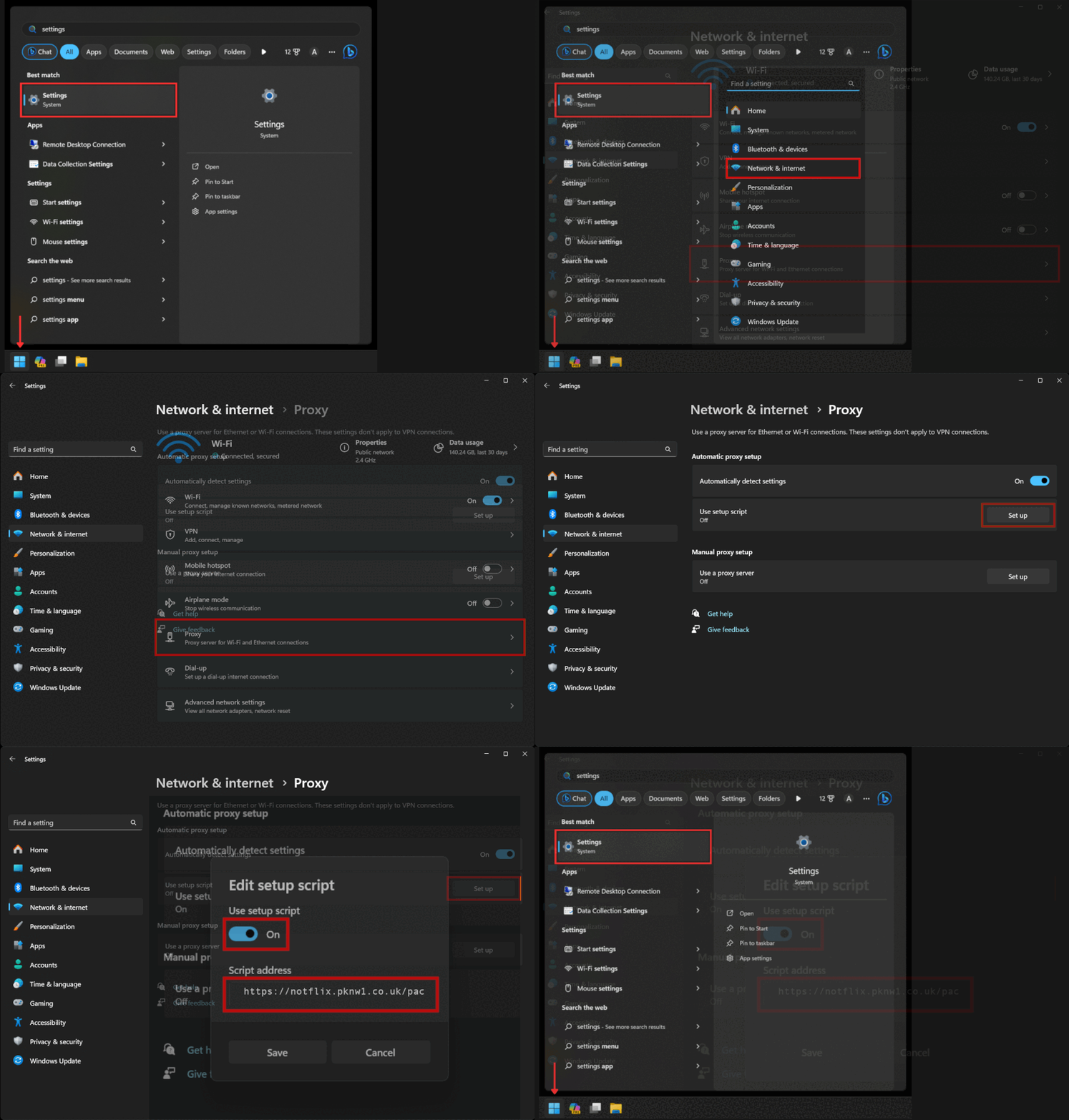
</td><td>##### https://notflix.pknw1.co.uk/pac

</td></tr></tbody></table>

#### Your current IP <span style="color: rgb(224, 62, 45);">**MUST**</span> be whitelisted in order to access the proxy - so if you cannot access or switchh networks, go to [https://access.pknw1.co.uk](https://access.pknw1.co.uk) and login - this will automatically update your IP for the proxy


#### Configuring Proxy Settings

<table border="1" id="bkmrk-iphone-ios-guide-and" style="border-collapse: collapse; width: 100%;"><colgroup><col style="width: 37.6557%;"></col><col style="width: 62.3443%;"></col></colgroup><tbody><tr><td>  
</td><td>  
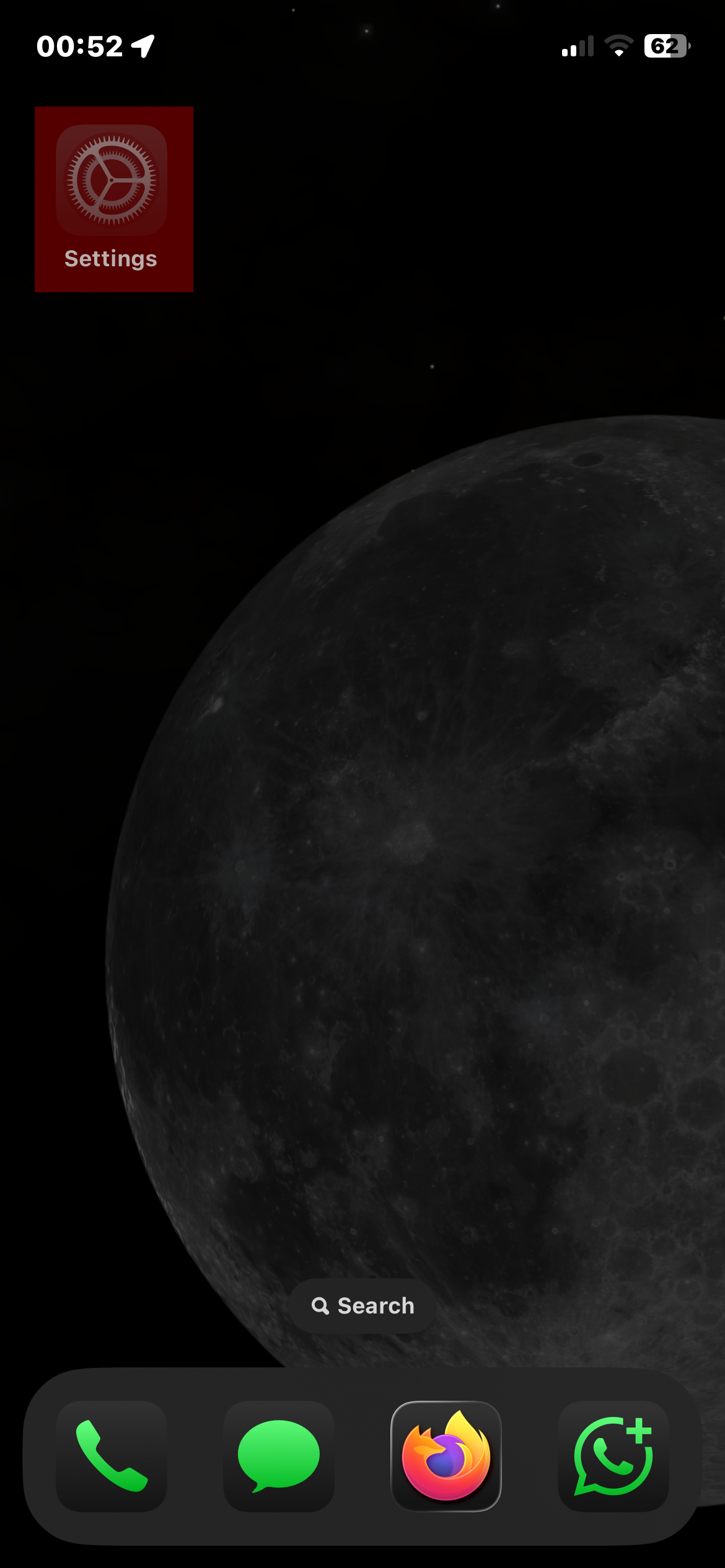
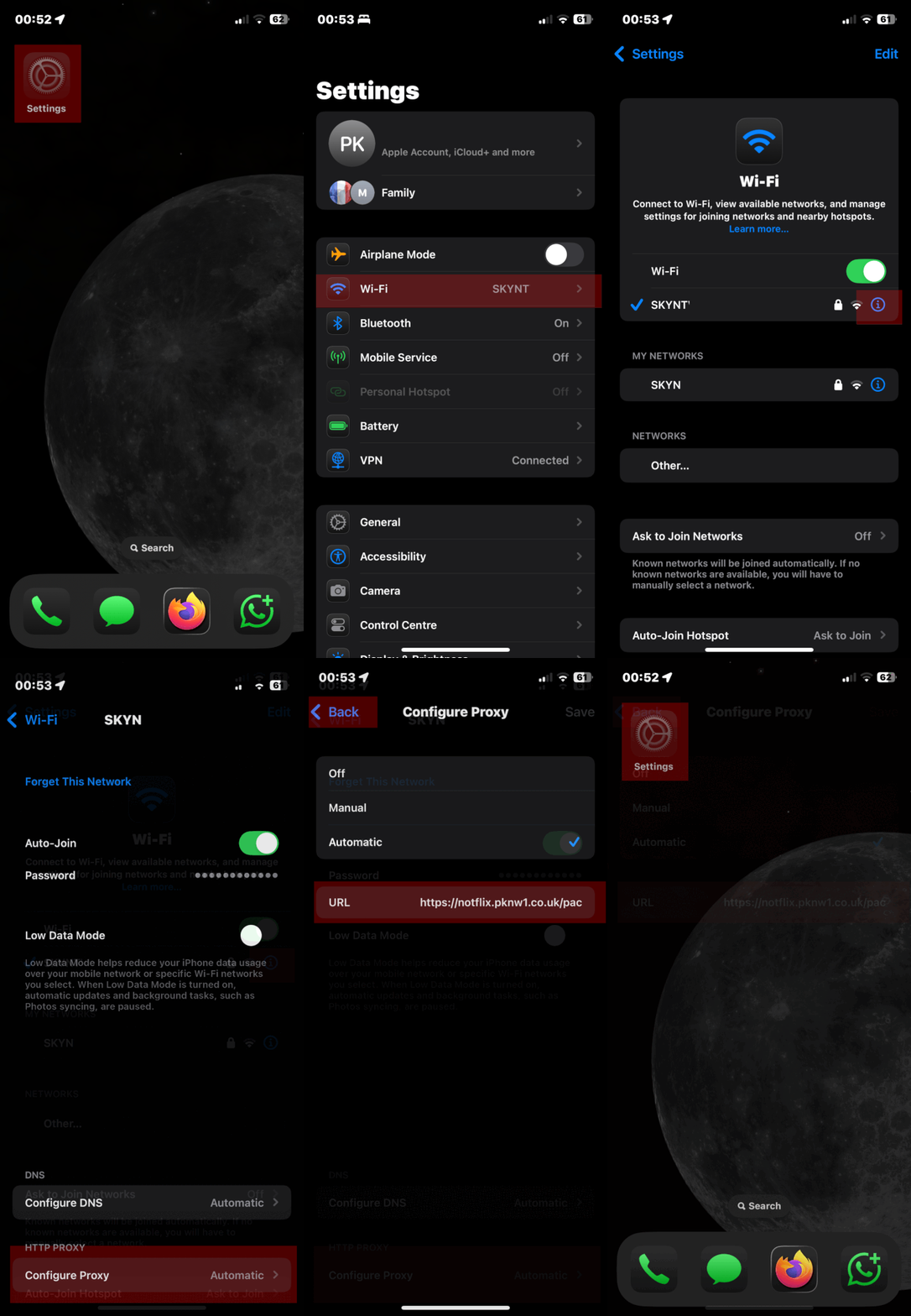
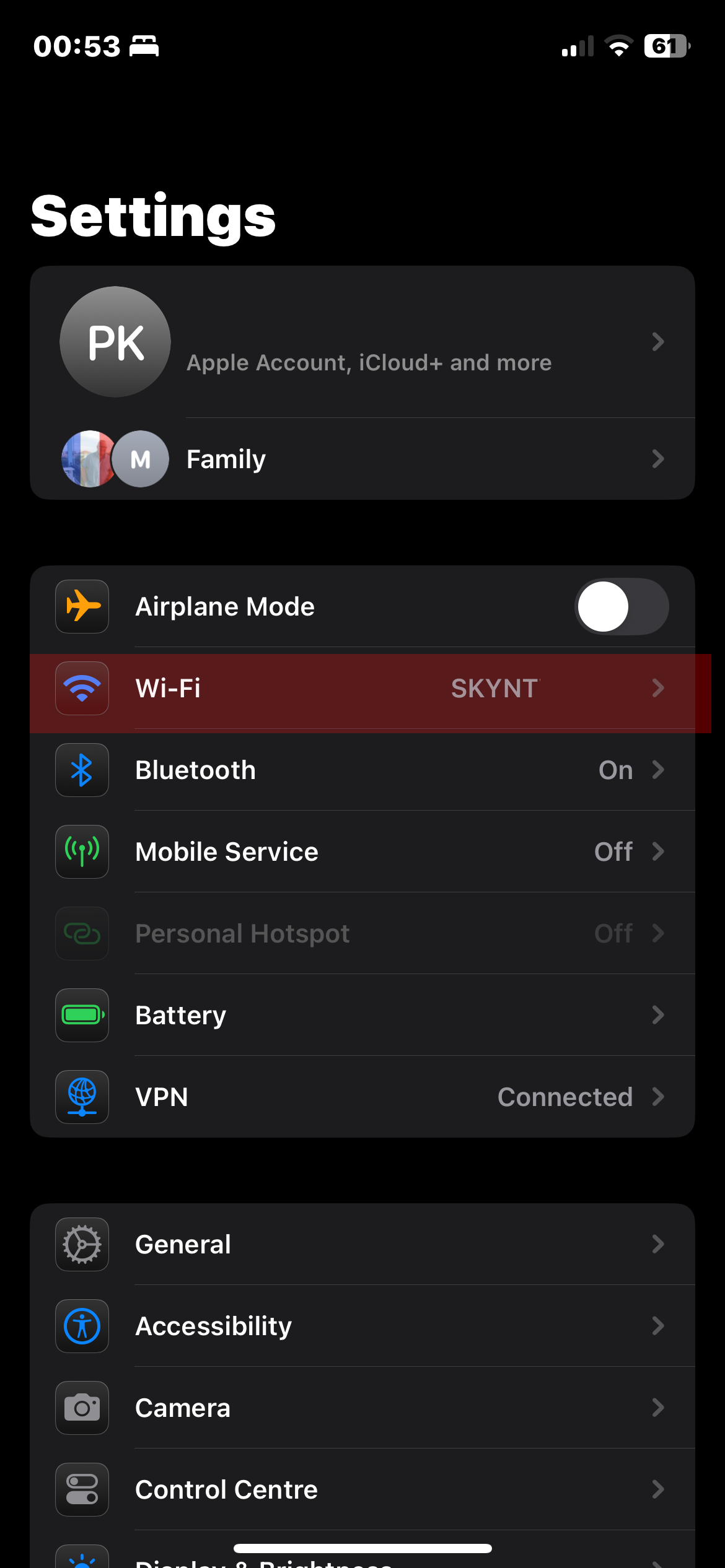
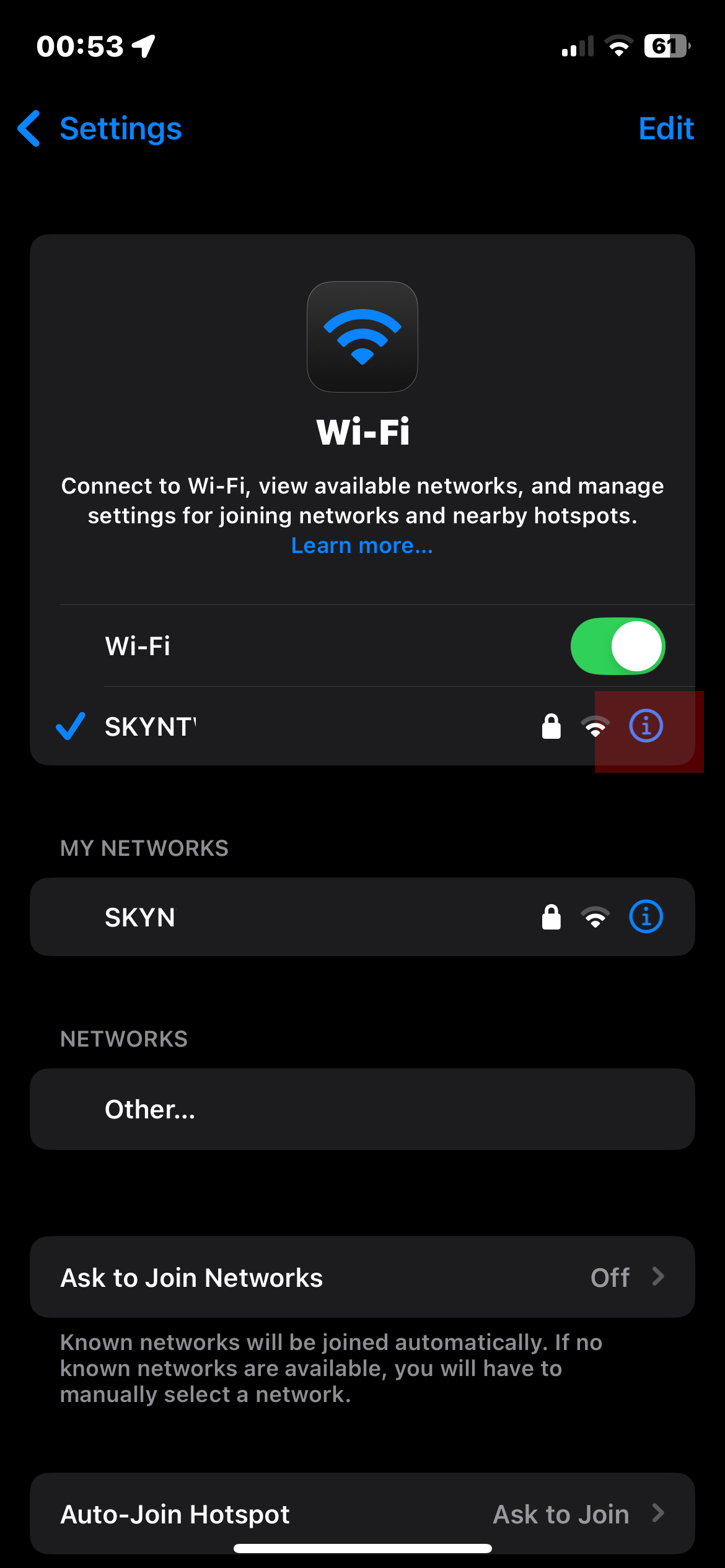
</td></tr><tr><td>[##### iPhone iOS Guide L](https://blog.froxy.com/en/proxy-ios)<details><summary></summary>

[![1.png](https://bookstack.notflix.pknw1.co.uk/uploads/images/gallery/2026-02/scaled-1680-/1.png)](https://bookstack.notflix.pknw1.co.uk/uploads/images/gallery/2026-02/1.png)

[![2.png](https://bookstack.notflix.pknw1.co.uk/uploads/images/gallery/2026-02/scaled-1680-/2.png)](https://bookstack.notflix.pknw1.co.uk/uploads/images/gallery/2026-02/2.png)
[![3.PNG](https://bookstack.notflix.pknw1.co.uk/uploads/images/gallery/2026-02/scaled-1680-/3.PNG)](https://bookstack.notflix.pknw1.co.uk/uploads/images/gallery/2026-02/3.PNG)
</details></td><td>[![ezgif-halfsize.gif](https://bookstack.notflix.pknw1.co.uk/uploads/images/gallery/2026-02/ezgif-halfsize.gif)](https://bookstack.notflix.pknw1.co.uk/uploads/images/gallery/2026-02/ezgif-halfsize.gif)

</td></tr><tr><td>##### Android Device Setup

</td><td>- [ ] ##### Open your Settings app.
- [ ] ##### Tap on Network &amp; Internet, then choose Wi-Fi.
- [ ] ##### Select the Wi-Fi network you’re connected to (or plan to connect).
- [ ] ##### Tap the Edit (pencil) icon next to the network name.
- [ ] ##### Scroll down and expand Advanced options.
- [ ] ##### Change Proxy from “None” to “Proxy Auto-Config”.
- [ ] ##### Enter **https://notflix.pknw1.co.uk/pac**
- [ ] ##### Hit Save to apply the settings.

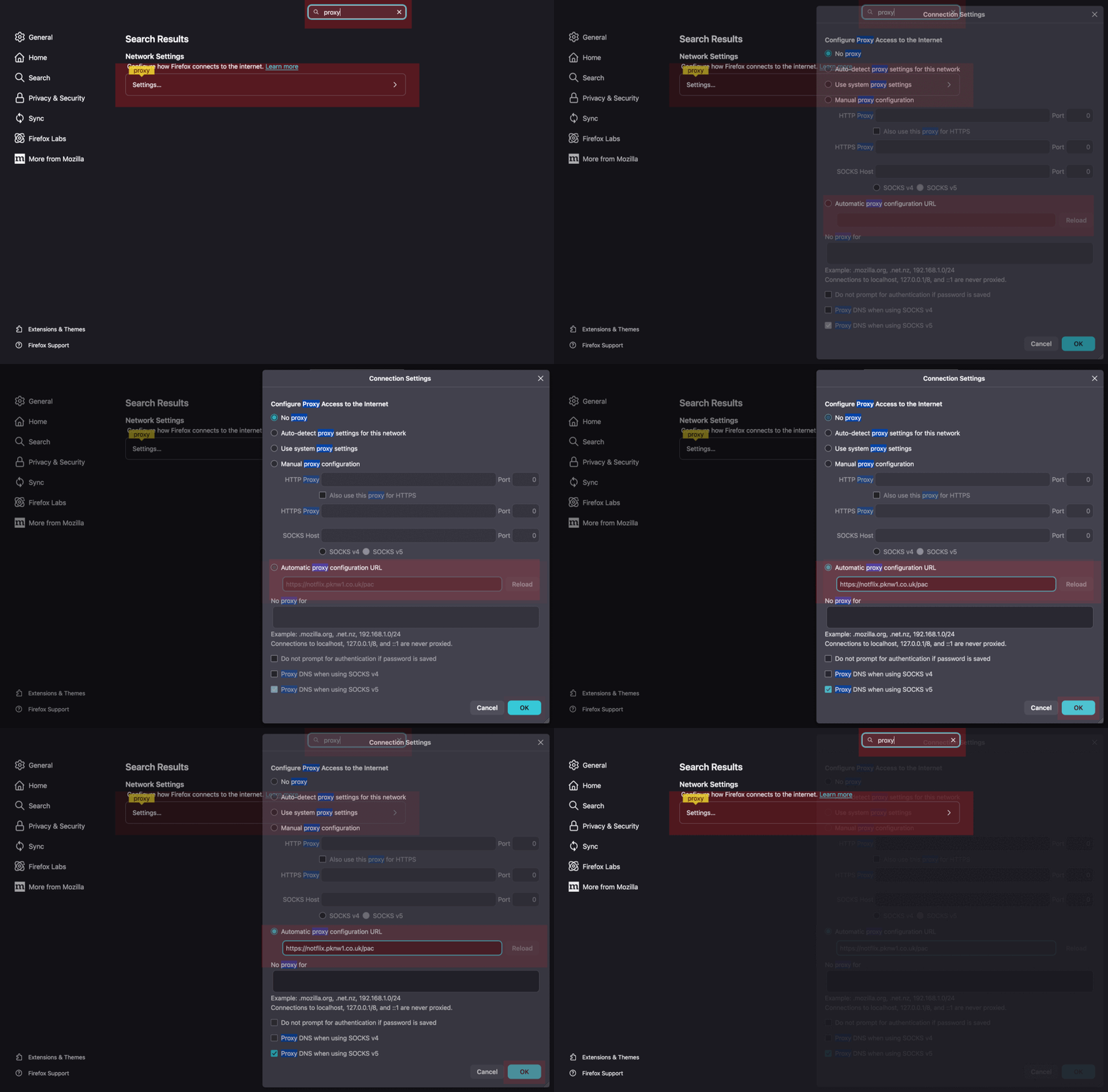
</td></tr><tr><td>##### **Firefox Browser**

- [ ] ##### Open Preferences
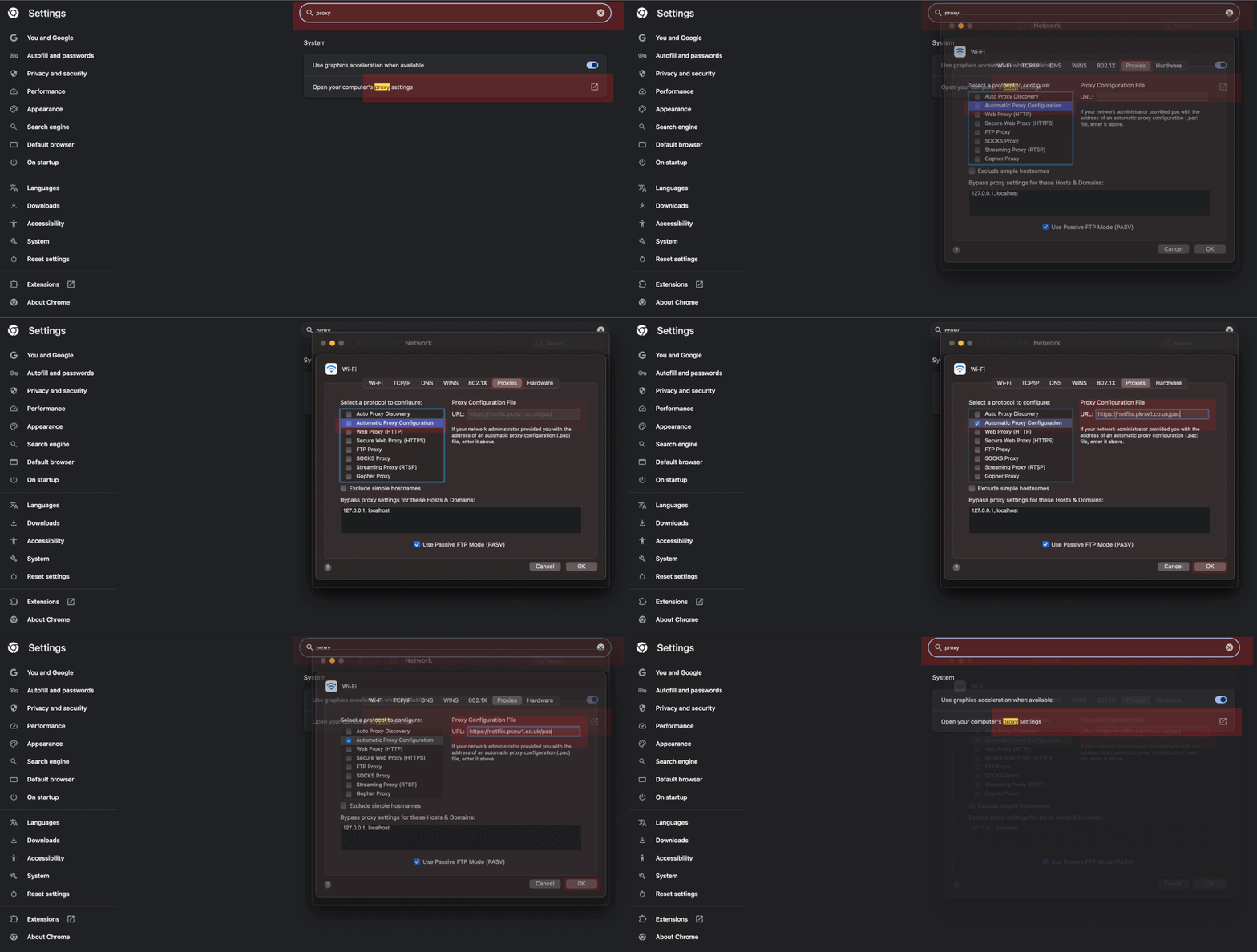
- [ ] ##### Search for Proxy
- [ ] ##### Enter the PAC URL under **Automatic proxy configuration URL**
- [ ] ##### **Hit OK to apply**

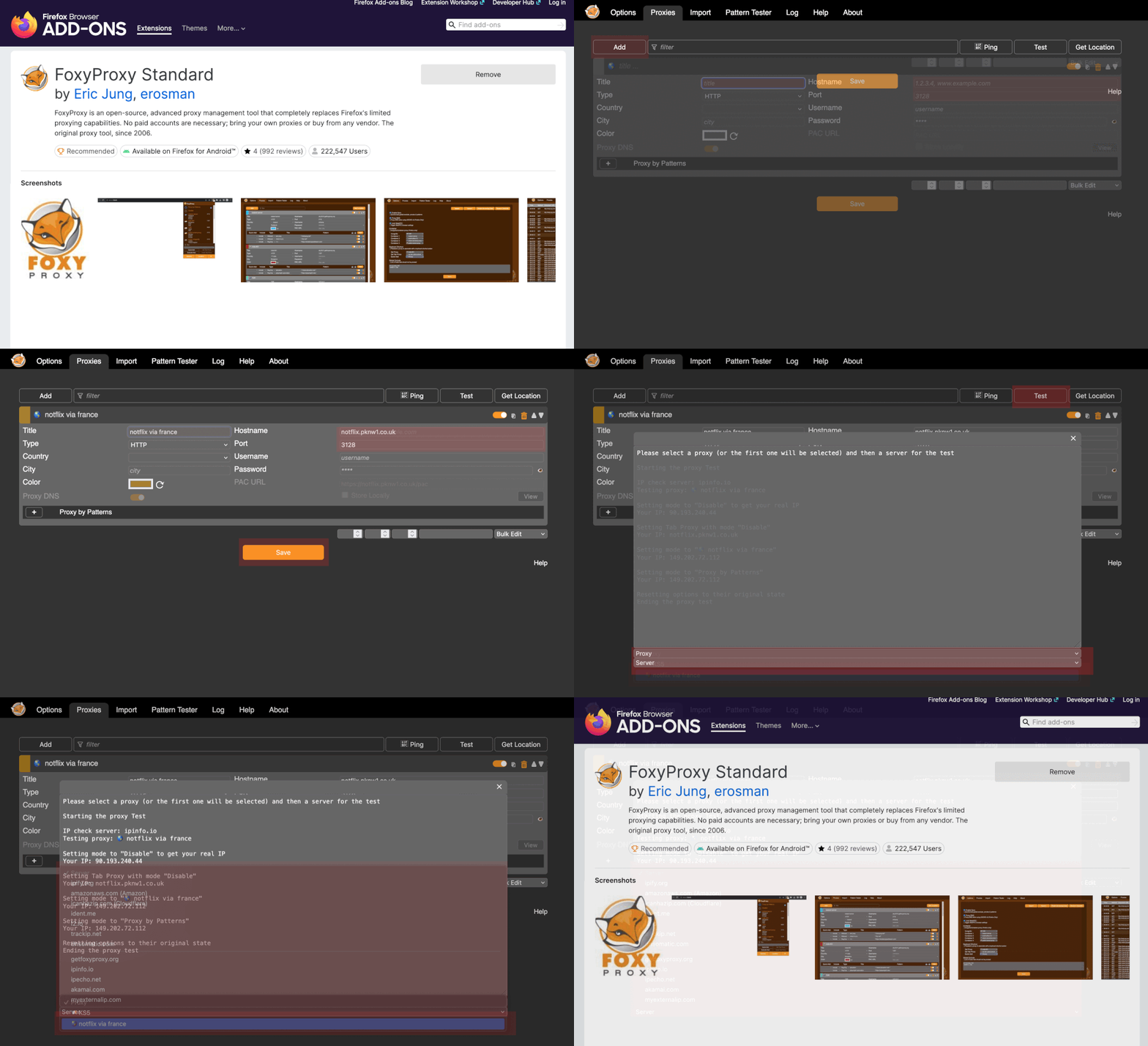
</td><td>[![ezgif-half.gif](https://bookstack.notflix.pknw1.co.uk/uploads/images/gallery/2026-02/ezgif-half.gif)](https://bookstack.notflix.pknw1.co.uk/uploads/images/gallery/2026-02/ezgif-half.gif)</td></tr><tr><td>##### **FoxyProxy Firefox Extension (recommended)**

  
</td><td>[![ezgif-half.gif](https://bookstack.notflix.pknw1.co.uk/uploads/images/gallery/2026-02/wXBezgif-half.gif)](https://bookstack.notflix.pknw1.co.uk/uploads/images/gallery/2026-02/wXBezgif-half.gif)</td></tr><tr><td>##### Google Chrome Browser

[chrome://settings/](chrome://settings/)

</td><td>[![ezgif-half.gif](https://bookstack.notflix.pknw1.co.uk/uploads/images/gallery/2026-02/vm7ezgif-half.gif)](https://bookstack.notflix.pknw1.co.uk/uploads/images/gallery/2026-02/vm7ezgif-half.gif)</td></tr><tr><td>[##### Windows 11 Guide](https://brightdata.com/blog/how-tos/set-up-proxy-in-windows-11)</td><td>[![ezgif-half.gif](https://bookstack.notflix.pknw1.co.uk/uploads/images/gallery/2026-02/aDeezgif-half.gif)](https://bookstack.notflix.pknw1.co.uk/uploads/images/gallery/2026-02/aDeezgif-half.gif)</td></tr><tr><td>  
</td><td>  
</td></tr><tr><td>  
</td><td>  
</td></tr></tbody></table>

<iframe src="https://i.pknw1.co.uk/adblock-compare.html"></iframe>

<div class="elfsight-app-529dc5fd-7552-4397-918e-06c7b4d01b1f" data-elfsight-app-lazy="" id="bkmrk--6" style="width: 50%;">  
</div>